Workflow visualization
The Local UI renders Chain, Swarm, and Supervisor topologies as an interactive React Flow canvas. Each node and edge type has a distinct visual treatment so the structure of your code is obvious at a glance.
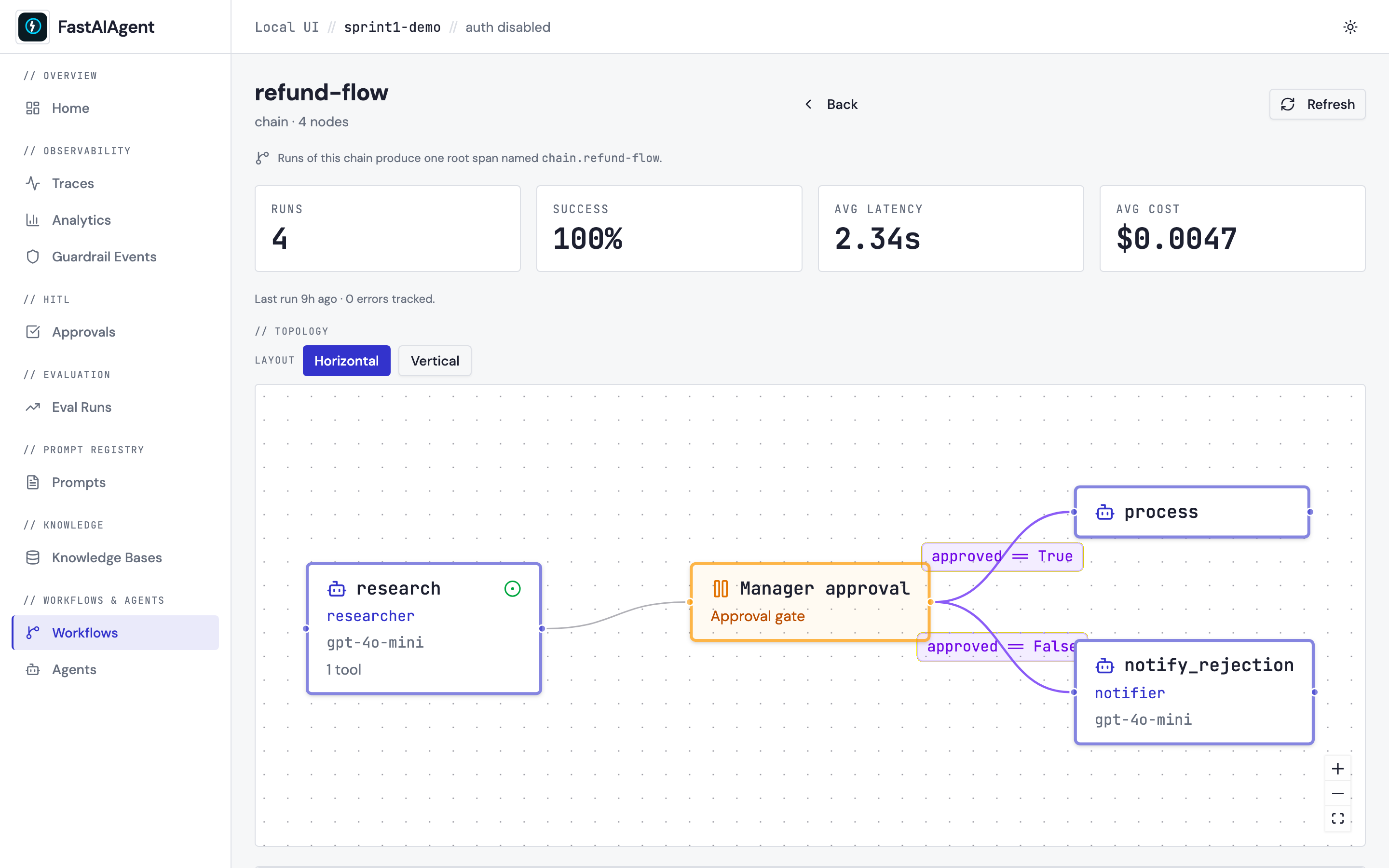
The shot above is captured from a real running Local UI by
scripts/capture-sprint1-screenshots.sh against the
refund-flow chain defined in
examples/47_workflow_topology.py.
The agent node research carries the green entry-point dot, conditional
edges out of the HITL gate carry their boolean expressions, and the
function node process is rendered with the wrench icon.
Where it appears
- Workflow detail page (
/workflows/{runner_type}/{name}): full topology view above the KPI cards and recent traces. - Agent detail page (
/agents/{name}): one compact preview card per registered workflow that contains this agent. Click the card to open the full view.
Registering a workflow
Topology rendering reads from the runtime registry — the workflows you
pass to build_app(runners=[...]). Until a runner is registered the UI
shows a "No topology available" callout with a code snippet.
from fastaiagent import Agent, Chain
from fastaiagent.ui.server import build_app

researcher = Agent(name="researcher", llm=llm)
writer     = Agent(name="writer",     llm=llm)

chain = Chain("refund-flow")
chain.add_node("research", agent=researcher)
chain.add_node("write",    agent=writer)
chain.connect("research", "write")

app = build_app(runners=[chain])
Chain, Swarm, and Supervisor instances are all accepted. The
registered name comes from runner.name.
If you start the UI from the CLI rather than embedding it, use --agent
instead — it fills the same registry:
Node types
| Type | Visual | Used for |
|---|---|---|
| Agent | Rounded rectangle, primary border, bot icon | Chain agent nodes, Swarm peers, Supervisor workers |
| Supervisor | Rounded rectangle, emerald border, crown icon | The Supervisor itself |
| HITL | Rounded rectangle, amber border, pause icon | interrupt() / approval gates |
| Decision | Rounded rectangle, violet border, branch icon | Chain condition nodes |
| Function / Start / End | Rounded rectangle, neutral border, wrench / flag / square icon | Chain tool, start, end, transformer, parallel nodes |
The entry point — the topologically first node — gets a small green dot indicator on the upper-right corner.
Edge types
| Type | Style | Label |
|---|---|---|
| Sequential | Solid, default color | (none) |
| Conditional | Solid, violet | The condition expression |
| Handoff | Solid, primary color | handoff |
| Delegation | Dashed, emerald | delegate |
Interaction
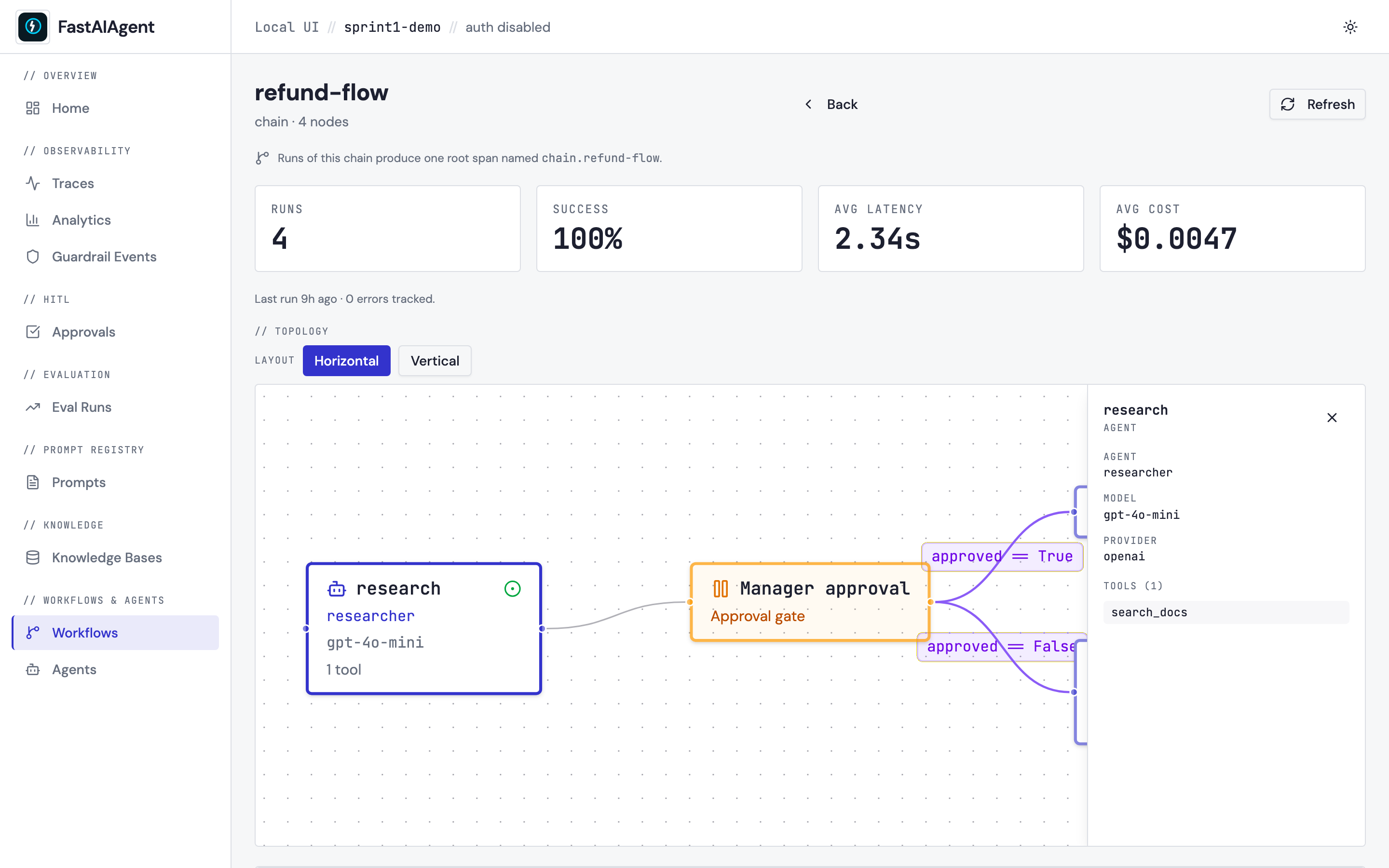
- Click a node to open a slide-out panel with the agent name, model, provider, and tool list (shown above).
- Hover an edge for a tooltip; conditional edges show their full expression on the edge label.
- Pan and zoom with standard React Flow controls (mouse drag, scroll, pinch).
- Toggle layout between horizontal (left-to-right) and vertical
(top-to-bottom). The choice is persisted in
localStorage["fa.workflow.layout"].
Topology JSON
The frontend reads from GET /api/workflows/{runner_type}/{name}/topology,
which returns a self-describing JSON document:
{
  "name": "refund-flow",
  "type": "chain",
  "entrypoint": "research",
  "nodes": [
    {"id": "research", "type": "agent", "label": "researcher", "model": "gpt-4o", "tool_count": 2},
    {"id": "approval", "type": "hitl",  "label": "Manager approval"},
    {"id": "process",  "type": "tool",  "label": "process_refund", "tool_name": "process_refund"}
  ],
  "edges": [
    {"from": "research", "to": "approval", "type": "sequential"},
    {"from": "approval", "to": "process",  "type": "conditional", "condition": "approved == True"}
  ],
  "tools": [
    {"owner": "research", "name": "search_docs", "type": "function"}
  ],
  "knowledge_bases": []
}
The same endpoint shape works for Swarm (type: "swarm", edges tagged
handoff) and Supervisor (type: "supervisor", edges tagged
delegation).
Edit-from-UI?
Topology rendering is read-only. Editing a workflow lives in code or on Platform's visual canvas — not the local UI. The Local UI's job is to make your code's structure visible, not to fork it.