Agent Replay
Agent Replay lets you load any past execution trace, step through it, inspect each step's input/output/attributes, fork at any point, modify the prompt or input, and rerun from that point. This is the SDK's unique debugging feature — no other framework offers fork-and-rerun.
Fidelity guarantees
For per-mode behavior (live vs recorded vs deterministic), what's captured, what isn't, and per-provider seed support, see Fidelity Guarantees.
Production failure → regression test
The full capture → analyze → fix → save → verify loop, with
a deliberately broken tool to demonstrate against, ships as
examples/regression-from-trace/.
Use it as the canonical pattern when a customer reports the agent
did something wrong.
Why Replay?
When an agent fails in production — hallucinates, calls the wrong tool, gives a bad answer — you need to understand why and test a fix without burning new production traffic. Replay lets you:
- Load the exact trace of the failure
- Step through to find the problematic step
- Fork at that step (records where the divergence will be measured)
- Change the prompt, input, tools, or state
- Rerun the agent end-to-end with your modifications applied
- Compare the original vs fixed result, scored by
LLMJudgeorexact_match
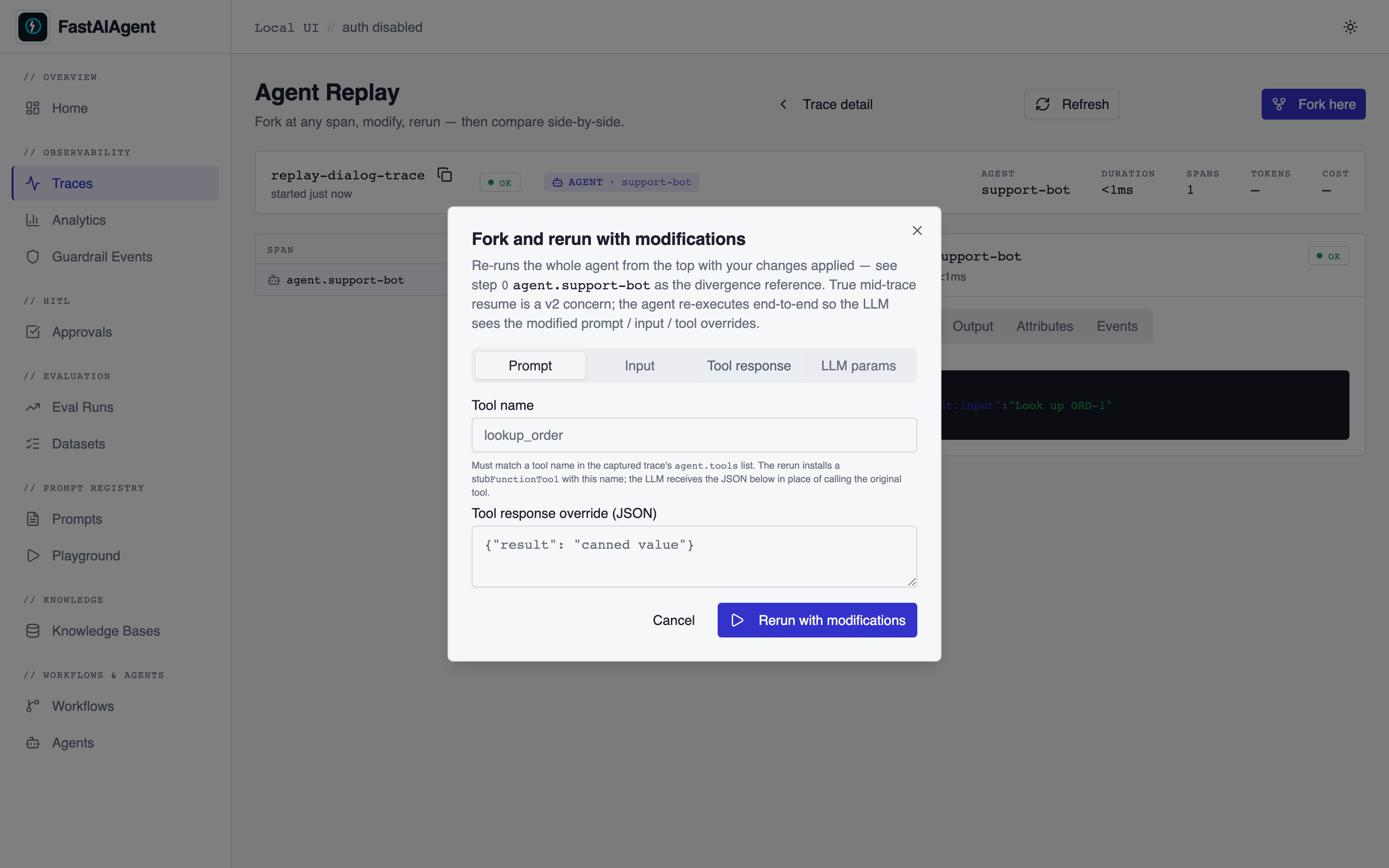
v1 limitation — full rerun, not mid-trace resume
The v1 arerun() re-executes the agent from the top with the
modifications applied. The fork step records the divergence anchor
used by compare(), not a resume point. True mid-trace resume
(replaying messages up to a step, then continuing) is a v2
concern that requires a stable on-span message-history shape
across providers. For most debug workflows the full rerun is what
you want anyway — the modified prompt / tool override applies for
the whole run, not just the suffix.
The Local UI surfaces this in the Fork and rerun with
modifications dialog (renamed in v1.14.1 from "Rerun from this
step", which overpromised partial replay). The Tool tab now requires
a tool name alongside the JSON response so the override is wired
through with_tool_override for real — pre-v1.14.1 it was silently
dropped for agent reruns.
Where Do Trace IDs Come From?
Every agent.run() automatically generates a trace. The trace ID is returned in the result:
result = agent.run("Help me with my order")
print(result.trace_id)  # "b6acf1ef2c2779bbc2fcf80802ae0534"
You can also browse past traces programmatically or via CLI:
from fastaiagent.trace import TraceStore
for t in TraceStore().list_traces(last_hours=24):
    print(f"{t.trace_id}  {t.name}  {t.status}")
Loading a Replay
From Local Trace Storage
from fastaiagent.trace.replay import Replay

# Load by trace ID (from result.trace_id or fastaiagent traces list)
replay = Replay.load("b6acf1ef2c2779bbc2fcf80802ae0534")
From a TraceData Object
from fastaiagent.trace.storage import TraceStore

store = TraceStore()
trace_data = store.get_trace("b6acf1ef2c2779bbc2fcf80802ae0534")
replay = Replay(trace_data)
Viewing the Summary
Output:
Trace: b6acf1ef2c2779bbc2fcf80802ae0534
Name: agent.support-bot
Status: OK
Spans: 4
Duration: 2025-01-15T10:30:00Z → 2025-01-15T10:30:02.5Z

Steps:
  [0] agent.run
  [1] llm.chat_completion
  [2] tool.search_docs
  [3] llm.chat_completion
Stepping Through
All Steps
steps = replay.step_through()
for step in steps:
    print(f"Step {step.step}: {step.span_name}")
    if step.attributes:
        print(f"  Attributes: {step.attributes}")
Specific Step
steps = replay.steps()
print(f"Total steps: {len(steps)}")

# Inspect a specific step
step = replay.inspect(2)
print(f"Name: {step.span_name}")
print(f"Span ID: {step.span_id}")
print(f"Timestamp: {step.timestamp}")
print(f"Attributes: {step.attributes}")
ReplayStep
| Field | Type | Description |
|---|---|---|
step |
int |
Step index (0-based) |
span_name |
str |
What happened (e.g., "llm.chat_completion", "tool.search") |
span_id |
str |
Unique span identifier |
input |
dict |
Input to this step |
output |
dict |
Output from this step |
attributes |
dict |
OTel attributes (model, tokens, tool name, etc.) |
timestamp |
str |
When this step executed |
Forking and Rerunning
The core debugging workflow — fork at the problem step, fix, rerun:
# Step 3 is where the LLM hallucinated
forked = replay.fork_at(step=3)

# Modify what you want to fix
forked.modify_prompt("Always cite the exact policy section number. Never guess.")
forked.modify_input({"query": "refund policy section 4.2"})

# Rerun from that point
result = forked.rerun()
print(f"New output: {result.new_output}")
print(f"Steps executed: {result.steps_executed}")
How rerun() reconstructs the agent
ForkedReplay.rerun() is a real re-execution, not a stub. Under the hood it:
- Finds the root
agent.{name}span in the loaded trace. - Reads the Agent Reconstruction Attributes off that span —
agent.config,agent.tools,agent.guardrails,agent.llm.config,agent.system_prompt,agent.input— and decodes them into the canonicalAgent.from_dictpayload. - Applies your
modify_prompt/modify_config/modify_inputmodifications on top of that payload. - Rebinds tool callables by name via the
ToolRegistry. Tools created withFunctionTool(name=..., fn=...)or the@tooldecorator auto-register at construction, so replay inside the same process picks them up automatically. - Builds a new
AgentviaAgent.from_dict()and callsagent.arun(new_input). A new trace is emitted for the rerun, and itstrace_idis returned onReplayResult.trace_id.
v1 scope. The rerun re-executes the agent from the top with modifications applied — it does not literally resume the LLM loop at fork_point with prior messages pre-seeded. fork_point is still recorded and used by compare() to mark where divergence logically happened, so downstream tooling sees your intent. Mid-trace resume (replaying captured messages up to fork_point then continuing from there) requires a stable per-provider message-history representation and is planned as a follow-up.
What you need for rerun() to work:
- The SDK is at a version that captures
agent.*reconstruction attributes (0.1.7+). Traces from older versions can still be loaded and stepped through, butrerun()will fail to reconstruct the agent — re-run the agent once on the new SDK to capture a rerun-capable trace. - Any Python tool callables the agent used are registered in the
ToolRegistryof the replay process. Importing the module that defines the tools is usually enough. FASTAIAGENT_TRACE_PAYLOADS=0was not set when the original trace was captured, if you want the resolved system prompt to round-trip. When payloads were off, modifications still work but the reconstructed agent uses whatever prompt your code supplies viamodify_prompt().
Available Modifications
| Method | What it changes |
|---|---|
modify_prompt(new_prompt) |
System prompt for the LLM call at the fork point |
modify_input(new_input) |
Input data passed to the step |
modify_config(**kwargs) |
Agent/LLM configuration (temperature, max_tokens, etc.) |
Forking with modified state is not done here.
trace/replay.pyis a read-only inspect/diff surface; trace-based state counterfactuals are the Enterprise Replay engine's job. To branch a run from a saved step with a modified state, use the SDK's checkpoint-fork primitive —Chain.afork(...)/Agent.afork(...). (ForkedReplay.modify_state()raisesNotImplementedErrorpointing there.)
Methods return self for chaining:
result = (
    replay.fork_at(step=3)
    .modify_prompt("Be more precise.")
    .modify_input({"context": "additional context"})
    .modify_config(temperature=0.2)
    .rerun()
)
Comparing Results
After rerunning, compare the original and fixed execution:
forked = replay.fork_at(step=3)
forked.modify_prompt("New instructions")
result = forked.rerun()

comparison = forked.compare(result)
print(f"Original steps: {len(comparison.original_steps)}")
print(f"Diverged at step: {comparison.diverged_at}")
ComparisonResult
| Field | Type | Description |
|---|---|---|
original_steps |
list[ReplayStep] |
Steps from the original trace |
new_steps |
list[ReplayStep] |
Steps from the rerun (if available) |
diverged_at |
int \| None |
Step index where results diverged |
ReplayResult
| Field | Type | Description |
|---|---|---|
original_output |
Any |
Output from the original execution |
new_output |
Any |
Output from the rerun |
steps_executed |
int |
Number of steps executed in the rerun |
trace_id |
str \| None |
Trace ID of the original execution |
ReplayResult also exposes save_as_test() for turning a verified fix into a regression case.
From a Rerun to a Regression Test
Once a forked.rerun() confirms the fix, append the case to a JSONL
dataset that the eval suite will replay on every future run. This
closes the loop: every production failure becomes a permanent test
case, captured at the exact step where it broke.
Code path: ReplayResult.save_as_test()
from fastaiagent.eval import evaluate
from fastaiagent.trace.replay import Replay

# 1. Reproduce the failure
failure = agent.run("What is our refund policy?")

# 2. Fork, fix, rerun
replay = Replay.load(failure.trace_id)
rerun = (
    replay.fork_at(step=0)
    .modify_prompt("Answer in exactly one sentence. Refund policy: 30 days.")
    .rerun()
)

# 3. Save the corrected behavior as a regression case
rerun.save_as_test(
    "regression_tests.jsonl",
    input="What is our refund policy?",
    expected_output=str(rerun.new_output),
    source_trace_id=failure.trace_id,  # provenance back to the original bug
)

# 4. Re-run the suite — string scorer or LLM-as-judge, your choice
results = evaluate(
    agent_fn=lambda text: agent.run(text).output,
    dataset="regression_tests.jsonl",
    scorers=["exact_match"],  # or [LLMJudge(criteria="correctness")]
)
Saved JSONL schema
Each line is a self-contained record consumable by evaluate():
{
  "input": "What is our refund policy?",
  "expected_output": "Refund policy: 30 days, full refund.",
  "trace_id": "0aad0d1ef2ca859a0f1cc1a6aebb2bc7",
  "created_at": "2026-05-21T17:07:26.708546+00:00"
}
| Field | Source | Used by evaluate() |
|---|---|---|
input |
Argument you pass to save_as_test() |
Yes — fed to agent_fn |
expected_output |
Argument you pass | Yes — fed to the scorer |
trace_id |
source_trace_id arg, else self.trace_id |
No — pure provenance |
created_at |
UTC ISO-8601 when saved | No — pure provenance |
The provenance fields are written for humans — both the Local UI and the eval results page link them back to the originating failure trace.
Works with any scorer (including LLM-as-Judge)
Because the JSONL schema is just input/expected_output, the same
dataset works with any scorer in the eval framework:
"exact_match","contains"— fast deterministic string checksLLMJudge(criteria="correctness")— semantic equivalence via LLM- Custom
@scorerfunctions, trajectory scorers, safety scorers, RAG metrics
Pick the scorer that matches the kind of regression you're guarding
against. A worked example covering both string match and LLM-judge:
examples/62_replay_to_regression.py.
UI path: "Save as regression test" button
The same workflow is available from the Local UI's Replay page — after
a rerun, the Save as regression test button calls
POST /api/replay/forks/{fork_id}/save-as-test, which appends an
identical JSONL record (same four fields) to
./.fastaiagent/regression_tests.jsonl. UI-saved and code-saved
records are interchangeable.
Side-by-side comparison in the Local UI
Everything above is also available as a visual diff in the Local UI.
After running fastaiagent ui, open:
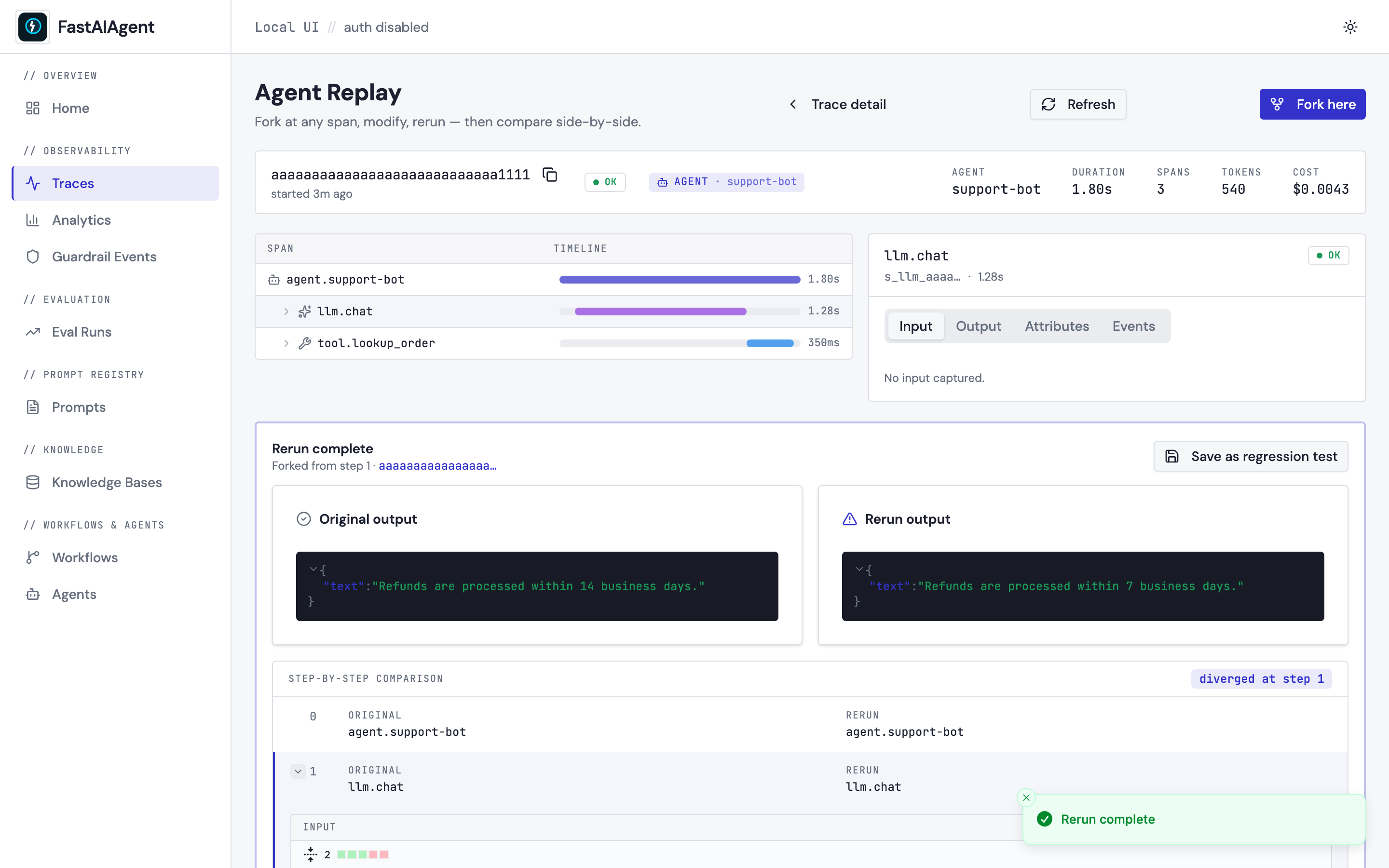
Click any span in the timeline → Fork here → pick one of the four tabs (Prompt / Input / Tool response / LLM params) → edit → Rerun from this step. The right pane fills with the forked run's spans as they arrive.
Below, a Rerun complete card appears with three pieces:
- Side-by-side output cards — the original final output and the
rerun's final output, rendered through
JsonViewer. - Step-by-step comparison grid — one row per step, with the
original span name on the left and the rerun's on the right. Rows
at or after
comparison.diverged_atare highlighted with a left border bar and a "diverged at step N" badge at the top right. - Expandable per-step diff — click the chevron on any row whose
inputs or outputs differ and a split-view diff
(powered by
react-diff-viewer-continued) expands inline, showing exactly what changed on that step.
The diff respects your current theme (light/dark). Save as
regression test appends the case to
./.fastaiagent/regression_tests.jsonl — the same file you'd write to
from code.
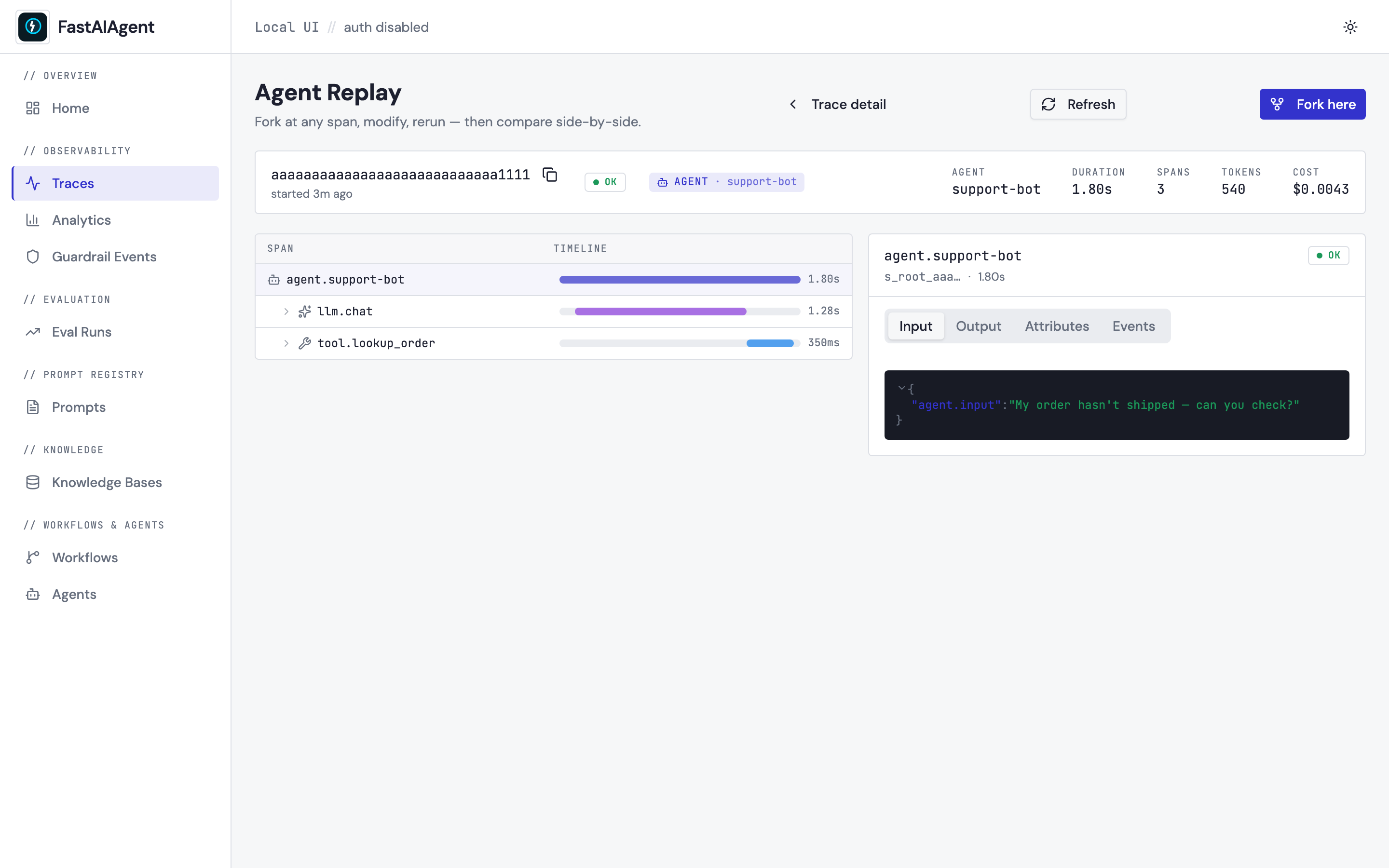
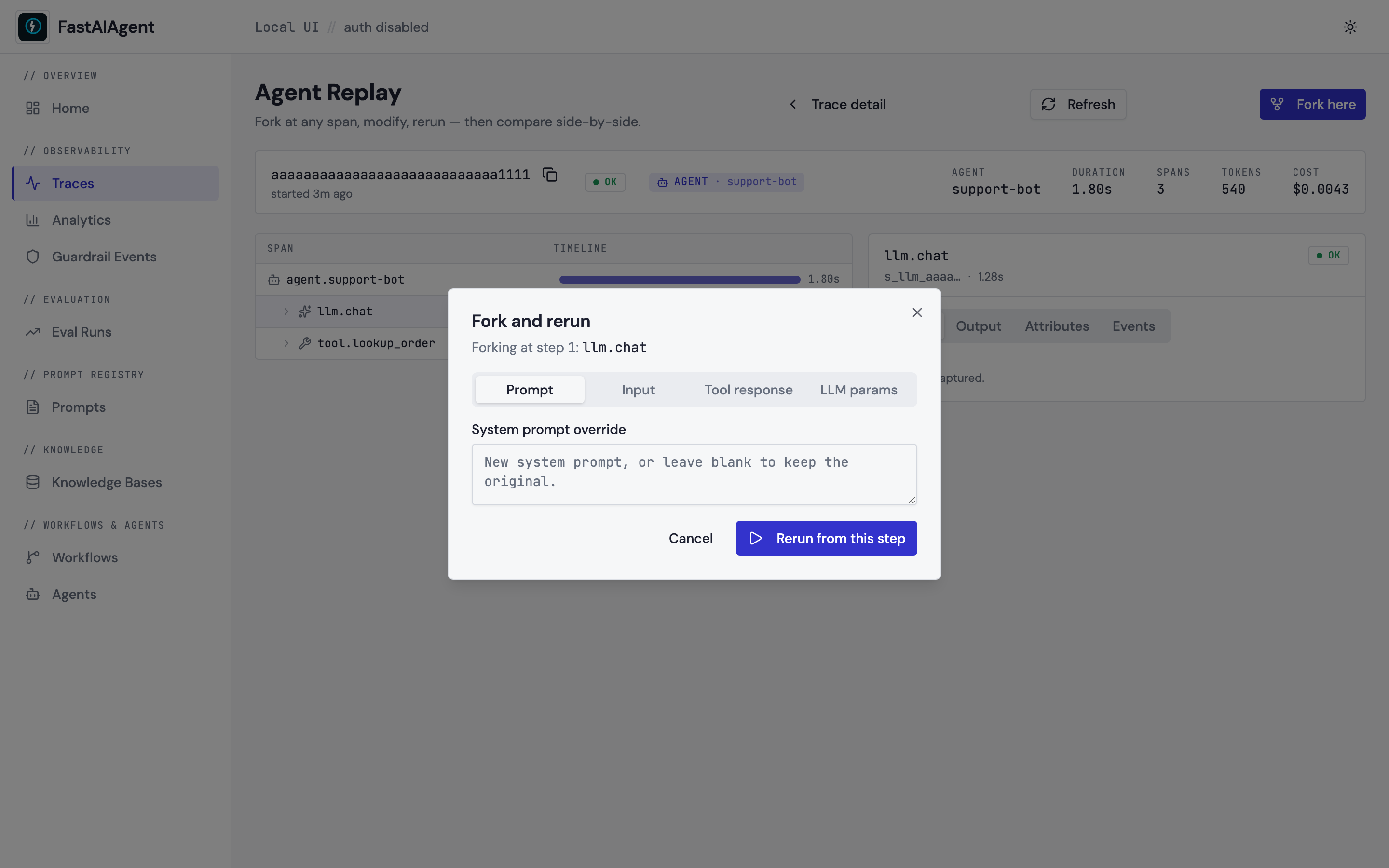
The replay page itself and the fork dialog are captured separately:
04-agent-replay.png— the/traces/:id/replaypage with span tree + inspector.05-replay-fork-dialog.png— the Fork-and-rerun dialog with its four tabs.
Clickable walkthrough
- From any trace on
/traces, click Open in Replay (or navigate directly to/traces/<id>/replay). - Click the span you want to branch from. The inspector on the right shows its inputs, outputs, attributes, and events.
- Click Fork here. Pick the tab for the field you want to change (Prompt / Input / Tool response / LLM params).
- Edit the field. Click Rerun from this step. The UI fires three
sequential requests behind the scenes:
POST /api/replay/<id>/fork→PATCH /api/replay/forks/<fork_id>→POST /api/replay/forks/<fork_id>/rerun. - When the rerun lands, the page auto-fetches the comparison and renders the card described above.
- Click any row's chevron to see the per-step diff. Click Save as
regression test to append the case to
./.fastaiagent/regression_tests.jsonl.
End-to-end bug-fix walkthrough
A full scripted example — buggy prompt → fork → fix → rerun → compare
→ assert → save-as-regression → UI deep links — lives at
examples/38_replay_comparison.py.
Pair it with the Local UI page above for the visual side-by-side.
CLI Commands
# Show replay steps for a trace
fastaiagent replay show <trace_id>

# Inspect a specific step
fastaiagent replay inspect <trace_id> 3
Example:
$ fastaiagent replay show b6acf1ef2c27

Trace: b6acf1ef2c2779bbc2fcf80802ae0534
Name: agent.support-bot
Status: OK
Spans: 4

Steps:
  [0] agent.run
  [1] llm.chat_completion
  [2] tool.search_docs
  [3] llm.chat_completion

$ fastaiagent replay inspect b6acf1ef2c27 2

Step 2: tool.search_docs
  Timestamp: 2025-01-15T10:30:01.300Z
  Attributes: {'fastaiagent.tool.name': 'search_docs'}
Debugging Workflow
A typical debugging session:
from fastaiagent.trace import TraceStore
from fastaiagent.trace.replay import Replay

# 1. Find the failing trace
store = TraceStore()
traces = store.search("support-bot")
# Or use: fastaiagent traces list

# 2. Load and inspect
replay = Replay.load(traces[0].trace_id)
print(replay.summary())

# 3. Step through to find the problem
for step in replay.step_through():
    print(f"[{step.step}] {step.span_name}: {step.attributes}")
# Step 3: LLM hallucinated the refund policy ← found it

# 4. Fork and fix
forked = replay.fork_at(step=3)
forked.modify_prompt("Always cite exact policy section numbers from the docs.")

# 5. Rerun and verify
result = forked.rerun()
print(f"Fixed output: {result.new_output}")

# 6. Compare
comparison = forked.compare(result)
print(f"Diverged at step {comparison.diverged_at}")
Error Handling
from fastaiagent._internal.errors import ReplayError

try:
    step = replay.inspect(99)
except ReplayError as e:
    print(f"Error: {e}")  # "Step 99 out of range (0-3)"

try:
    forked = replay.fork_at(-1)
except ReplayError as e:
    print(f"Error: {e}")  # "Step -1 out of range (0-3)"
Platform Replay
When connected to the FastAIAgent Platform, you can pull any trace from the platform (including traces from other team members) and replay locally:
import fastaiagent as fa

fa.connect(api_key="fa-...", project="my-project")

# Pull a platform trace and replay locally
replay = Replay.from_platform(trace_id="tr-abc123")
replay.step_through()

# Fork from a platform trace
forked = replay.fork_at(step=3)
forked.modify_prompt("Updated system prompt")
result = forked.rerun()
Next Steps
- Tracing — How traces are captured and stored
- Chains Checkpointing — Resume failed chains from checkpoints
- Evaluation — Systematically test agent quality