Security Posture
This page consolidates the SDK's security-relevant features so you can review them in one place before shipping a FastAIAgent-powered system to production.
Local data storage
The SDK writes all trace, checkpoint, eval-run, and project data to a
local SQLite database under ~/.fastaiagent/ by default
(FASTAIAGENT_HOME overrides the location). Nothing leaves your
machine unless you explicitly:
- Call
fastaiagent.connect(...)to push artifacts to the platform. - Register a custom OTel
SpanExporterviafastaiagent.trace.add_exporter(...).
The local database is kept readable and writable only by the owning OS
user: the SDK tightens ~/.fastaiagent/ to 0700 and local.db to
0600 on every open, removing any group/other access (it never touches
owner bits, and never loosens perms that are already stricter). This also
repairs databases created by older versions that left them world-readable.
If you deliberately share the directory with a group, opt out with
FASTAIAGENT_DB_KEEP_PERMS=1. Back it up like any other state directory.
Local UI authentication
The bundled Local UI (fastaiagent ui) ships with three modes:
- No-auth (default for
localhost): Browser-only; the UI binds to127.0.0.1and is unreachable from other hosts. - Password auth: Set up via
fastaiagent ui --auth password. Uses bcrypt + itsdangerous-signed cookies. CSRF middleware enforces a double-submit token on every state-changing request. - Custom OAuth / SSO: Wrap the FastAPI app with your own auth middleware; see Local UI / Deployment.
The CSRF middleware is exhaustively tested in
tests/test_ui_server.py via _CSRFAwareTestClient.
DNS-rebinding & cross-origin protection. The server validates the Host
header against a loopback allowlist, so a page that rebinds its own domain to
127.0.0.1 (arriving with Host: evil.example) is rejected with 400. It also
rejects state-changing requests carrying a cross-origin Origin header, which
protects the --no-auth API from CORS-simple writes a malicious page might
trigger. Set FASTAIAGENT_UI_ALLOWED_HOSTS (comma-separated) to permit a proxy
hostname. Non-browser clients (curl, scripts) send no Origin and are
unaffected.
Brute-force / rate-limit keys. The login lockout and the playground
LLM rate limiter are keyed on the client IP. By default this is the real
peer address, so a client can't rotate an X-Forwarded-For header to dodge
the limit. If you front the UI with a reverse proxy, set
FASTAIAGENT_UI_TRUST_PROXY=1 so the first X-Forwarded-For hop is used
instead — do this only when a trusted proxy is actually in front, or
clients could spoof it again.
Trace payload controls
Trace spans can carry full prompt messages, tool inputs/outputs, and model responses. Two independent levers gate what gets stored:
FASTAIAGENT_TRACE_PAYLOADS=0 — keep payloads local, never export them
FastAIAgent is local-first: your local store (local.db) and the
tools that read it — the Local UI and Agent Replay — are always full
fidelity, because Replay reconstructs a run from the captured prompts and
outputs. So payload capture is controlled at the export boundary, not
at capture.
When FASTAIAGENT_TRACE_PAYLOADS=0 is set, payload-bearing attributes
(gen_ai.request.messages, gen_ai.response.content,
gen_ai.response.tool_calls, gen_ai.request.tools, agent/chain
inputs and outputs, system prompts, tool args/results, retrieved
documents, and recalled memory) are stripped before spans leave the
machine — both when pushed to the control plane and when sent to any
exporter registered via fastaiagent.trace.add_exporter(...). Structural
metadata (provider, model, token counts, finish reasons, tool schemas,
latencies) always flows. This is the setting to use for a connected /
enterprise deployment where sensitive content must not egress but you
still want full local debugging.
Span events are gated too, since 1.62.0. A span carries two content
channels — its attributes and its events — and until 1.62.0 only the
first was filtered. That gap did not need anyone to write an event by
hand: OpenTelemetry records an exception on the enclosing span
automatically, and a blocked guardrail raises inside the agent's own span
carrying its result.message. For an llm_judge rule that message is the
judge's entire raw reply; for groundedness it quotes the unsupported
claims out of the model's answer. Both are model output over your content,
and both used to leave with FASTAIAGENT_TRACE_PAYLOADS=0 set.
exception.message and exception.stacktrace (SENSITIVE_EVENT_ATTR_KEYS)
are now dropped on egress alongside the attribute keys, on both the
control-plane and third-party exporter paths. exception.type is kept
deliberately — a class name is structural, so you can still see that a
GuardrailBlockedError occurred and where, without the text. As with
attributes, local.db keeps full fidelity, so the Local UI and Replay are
unaffected.
And the span status, since 1.62.0. A span's Status carries a free-text
description, and for a guardrail span that description is the rule's
failure message. Because the egress filter rebuilt only the attributes, that
text still reached any exporter registered with
fastaiagent.trace.add_exporter(...) — a Datadog or Jaeger backend, say — with
the gate on. The description is now withheld there too; the status code
always survives, so an errored span still reads as errored. The control-plane
path was never affected: its wire model carries the status as a bare code and
discards the description.
So a span has three content channels, and all three are gated:
| Channel | Registry | Filter |
|---|---|---|
attributes |
SENSITIVE_ATTR_KEYS + SENSITIVE_ATTR_PREFIXES |
apply_export_policy |
events |
SENSITIVE_EVENT_ATTR_KEYS |
apply_event_export_policy |
status.description |
— | otel._filtered_status |
With a RedactionPolicy installed and payload export left on, all three are
masked rather than dropped — you keep the diagnostic, without the values.
Integration-captured spans, since 1.67.0. A span produced by a third-party
instrumentor (LangChain, CrewAI, PydanticAI, any OpenTelemetry/OpenInference/
OpenLLMetry source) carries its prompt and completion on its own attribute
keys. trace.normalize copies that text onto the canonical keys the UI reads —
gen_ai.prompt, gen_ai.completion, gen_ai.response.text and their
fastaiagent.-namespaced forms — and leaves the originals (input.value,
output.value, and the indexed gen_ai.prompt.N.content /
llm.input_messages.N.message.content families) in place. None of those were in
the registry, so for every integration-captured agent both the copy and the
original egressed with FASTAIAGENT_TRACE_PAYLOADS turned off. They are all
gated now — the indexed families by prefix, since there is no bounded set of
names to enumerate. Local capture is unchanged, so the Local UI's trace search
still matches on them.
To capture nothing at all (not even locally), disable tracing entirely
with FASTAIAGENT_TRACE_ENABLED=0 — see the next section.
FASTAIAGENT_TRACE_ENABLED — the master switch
Off means no capture at all, not "capture and discard". The switch is
applied where the tracer provider is built, so the SDK hands out OpenTelemetry's
no-op tracer: spans are non-recording, attributes are never serialized, nothing
is written to local.db, no attachment bytes are stored, foreign-span capture
does not attach itself to anyone else's provider, and no exporter is registered
because there is nothing to export.
The cost is the Local UI and Replay along with it — there is no trace to read.
If you want local debugging but no egress, that is
FASTAIAGENT_TRACE_PAYLOADS=0, not this.
With tracing off, result.trace_id degrades to the all-zero trace id rather
than raising; code that stores or logs it keeps working.
This started working in 1.67.0
trace_enabled was parsed and documented from the beginning but read by
nothing, so anyone who set it has been capturing traces regardless. Setting
it now does what it always said it did.
Attachment bytes
Multimodal inputs (Image, PDF) are persisted to the trace_attachments
table in local.db, separately from span attributes:
| What | When | Where it can go |
|---|---|---|
| 256-px JPEG thumbnail | always | local.db only |
original bytes (full_data) |
only when fastaiagent.config.trace_full_images is on |
local.db; a portable export bundle you ask for |
Neither channel rides the span export path, so no attachment bytes reach the
control plane or any add_exporter target, with the payload gate on or off.
Two local surfaces do hand the originals back, deliberately and
ungated by FASTAIAGENT_TRACE_PAYLOADS:
GET /api/traces/{id}/spans/{id}/attachments/{id}?full=1— the Local UI's full-resolution modal, behind the UI's own session auth, on loopback.fastaiagent traces export/trace_export.py— base64-embedsfull_datainto the portable bundle.
Both are user-initiated local actions on a machine that already holds the
bytes, which is why they are not gated: the payload switch governs what the
SDK sends on its own initiative, not what an authenticated local operator asks
for. The distinction matters more now that trace_full_images is easy to turn
on (FASTAIAGENT_TRACE_FULL_IMAGES=1), so treat an exported bundle as carrying
the same sensitivity as the originals, and hand it around accordingly. If your
threat model needs the export gated too, leave trace_full_images off — with no
full_data stored there is nothing for the bundle to embed.
export_checkpoints=False — keep durability state off the plane
When connected, checkpoint state (state_snapshot, node_input,
node_output, interrupt_context) is replicated to the plane by default —
this applies to both the SQLite and external-Postgres checkpointers.
connect(export_checkpoints=False) (or FASTAIAGENT_EXPORT_CHECKPOINTS=0,
=false, =no, =off)
suppresses that replication. It is independent of export_traces.
This gates replication only. Your local durability (SQLite/Postgres) is untouched, so same-machine crash/interrupt resume still works with it off. What the plane replica additionally provides — and what you lose by disabling it — is cross-machine / distributed-runner resume (a runner resuming an execution that began on another host reads the plane), disaster recovery if the local store is lost, and console visibility of execution state. Keep it on if you rely on any of those.
RedactionPolicy — mask matched substrings
For cases where you want to keep payloads (debugging, replay) but
need to mask secrets that leaked through, install a regex-based
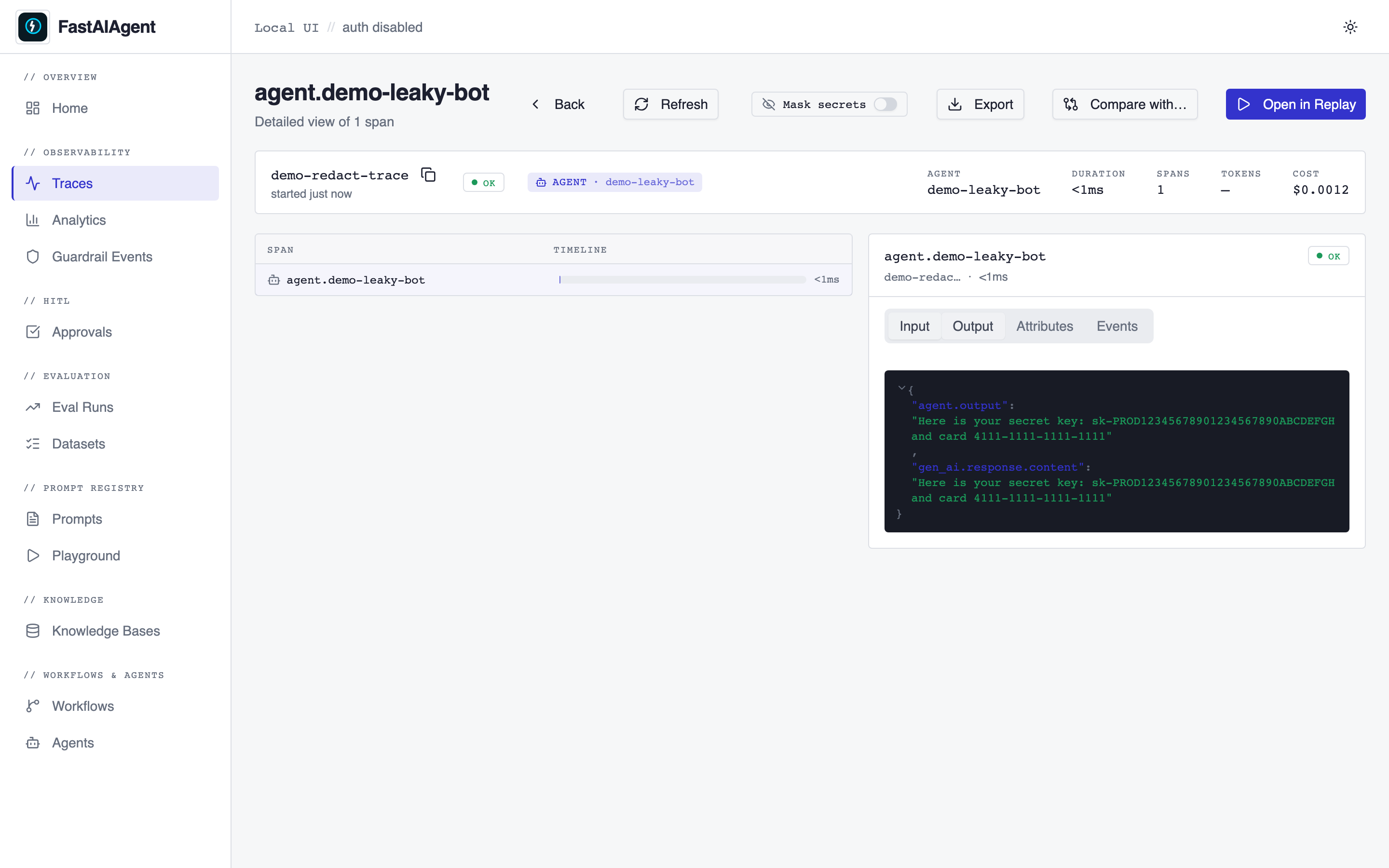
redaction policy. The Local UI exposes a "Mask secrets" toggle on
the trace detail page that sends ?redact=true to the trace API.
A capture- or both-mode policy reaches guardrail event metadata too, since
1.62.0. That matters most for a mask or override rule: the Local UI's
before/after diff stores the payload prior to redaction — the PII or secret the
rule exists to remove — and it was the one local write a policy could not reach,
while span attributes had been redacted on capture all along. Note the payload
gate (FASTAIAGENT_TRACE_PAYLOADS) deliberately does not apply here: it is an
export boundary, and local capture stays full fidelity so Replay keeps working.
When a policy with mode in {"read", "both"} is installed, the
toggle masks values in the rendered span output:
| Toggle OFF | Toggle ON |
|---|---|
 |
![Trace output with values masked to [REDACTED]](../ui/screenshots/0_2-redaction-toggle-on.png) |
Install a policy in code:
from fastaiagent.trace import RedactionPolicy, set_redaction_policy

set_redaction_policy(RedactionPolicy(
    patterns=(
        r"sk-[A-Za-z0-9]{32,}",          # OpenAI / Anthropic API keys
        r"\b\d{4}-\d{4}-\d{4}-\d{4}\b",  # 16-digit card numbers
        r"Bearer\s+[A-Za-z0-9\-_\.]+",    # JWTs / bearer tokens
    ),
    replacement="[REDACTED]",
    mode="capture",  # see below
))
Three modes, all opt-in:
| Mode | Effect |
|---|---|
"capture" (common) |
Mask before writing to SQLite. Downstream OTel exporters added via add_exporter(...) also receive the redacted version. Existing traces on disk are not modified. |
"read" |
Leave storage raw; mask on the way out when the UI is called with ?redact=true. Useful for screen-shares without rewriting history. |
"both" |
Apply both. Storage is masked AND read-time ?redact=true is honored. |
"off" |
No-op. Useful to temporarily disable an installed policy without unsetting it. |
Defaults to OFF. No policy is installed at SDK import time — you
must call set_redaction_policy(...) to enable redaction. Existing
user traces remain unaffected on upgrade — capture-mode redaction only
applies to spans written after the policy is installed.
Patterns are compiled once on RedactionPolicy(...) construction. The
sensitive-attribute key set (SENSITIVE_ATTR_KEYS) covers GenAI
request/response payloads, agent inputs/outputs, tool args/results,
and chain state by default; pass a custom apply_to_keys= set to
narrow or extend coverage.
RedactPII middleware (orthogonal)
The fastaiagent.RedactPII middleware masks PII in agent messages
before they're sent to the LLM and after the LLM responds. That's a
different layer than trace redaction — use it to prevent secrets from
being sent over the wire to a model. Trace redaction protects what's
stored after the fact.
Since 1.63.0 it uses the same detector as the pii guardrail type and
the no_pii() builtin, so cards are Luhn-validated. It previously carried
a private regex copy that redacted any 13–19 digit run — see
Middleware
for what that changes.
SSRF posture
The SDK uses httpx for all outbound HTTP. Fetches whose target can be
influenced by an LLM or by deserialized data — multimodal URL ingestion
(Image.from_url / PDF.from_url), RESTTool, and MCPTool — are routed
through a single SSRF-hardened helper that:
- allows only
http(s)schemes; - blocks private / loopback / link-local / reserved / multicast addresses
(including cloud-metadata
169.254.169.254), resolving hostnames first; - re-validates the target on every redirect hop;
- drops credential/session headers (
Authorization,Cookie, API-key headers) when a redirect crosses to a different origin, so a cooperating first hop can't bounce a bearer token to another host; and - caps the response body size.
MCPTool is the one exception to the loopback block: local MCP servers
(http://localhost:3000) are a common, legitimate pattern, so loopback is
permitted for MCP by default while every other private range stays blocked.
For other intranet hosts, opt in with FASTAIAGENT_ALLOW_PRIVATE_NETWORKS=1.
Governance (tool-approval egress)
When connected with a cached approval policy, a governed tool call sends the
tool name and its arguments (tool_input) to the plane's /policy/decide
so a value-based decision can be made (e.g. "approve refunds over $100" needs
the amount). This is intentional and only happens for tools whose name matches a
policy — unmanaged tools never egress their inputs, and the gate is fail-closed.
If a tool's arguments are too sensitive to leave the machine, do not place that
tool under a plane approval policy. Governance enrollment also reports the
machine hostname and a stable per-install id.
Deserialization trust boundary (Replay & runners)
Agent.from_dict / LLMClient.from_dict reconstruct a live agent from a plain
dict. That dict can originate outside your code — a trace replayed from
local.db, or a job payload a runner receives from the control plane — so
the SDK hardens the reconstruction:
- A serialized
api_keyis never trusted.to_dictnever emits it, so its presence signals a hand-crafted/tampered payload; it is ignored (credentials are resolved locally from the environment) and a warning is logged. base_urlmust behttp(s). Local endpoints (Ollama, a corporate proxy) are allowed; the tool-egress SSRF guards still apply toRESTTool/MCPTool.- Replay executes the trace's stored configuration (its
base_url, tools, system prompt). Only replay traces you trust — alocal.dban attacker can write is a config-execution vector, the same as any local data store.
The runner additionally requires an https:// --connect URL for any
non-loopback plane (it runs plane-dispatched work with your credentials). Dev
loopback http is allowed; FASTAIAGENT_RUNNER_ALLOW_INSECURE=1 overrides for a
trusted-network http plane.
Outbound TLS to model providers
All calls the SDK makes to model providers verify TLS by default. You can
point at a corporate gateway's CA bundle with verify="/path/to/ca.pem"
(per LLMClient) or FASTAIAGENT_LLM_VERIFY=/path/to/ca.pem (process-wide,
no code) — always prefer this over disabling verification. Setting
FASTAIAGENT_LLM_VERIFY to any false value (0/false/no/off) disables
verification for clients that didn't specify verify= explicitly and logs a
warning each time; an explicit verify=True is never downgraded by the
environment. Anything that is neither a true nor a false value is treated as a
CA-bundle path, with ~ and $VARS expanded. Platform / control-plane
calls always verify and cannot be disabled.
RESTTool requests and WebFetch-style tools do not currently
restrict destination IPs — if you wrap a public-internet-touching
tool around your agent, run it under an egress proxy.
Secret handling guidance
- API keys for LLM providers belong in environment variables
(
OPENAI_API_KEY,ANTHROPIC_API_KEY, etc.) not in source. TheLLMClientresolves them on construction. Tests that hit real providers must be wrapped inzsh -lc 'python …'so the keys from~/.zshrcreach the subprocess. - Trace payloads can echo secrets the agent saw. Install a
redaction policy for any production-facing setup. Run
tests/test_trace_redaction.pyagainst your patterns before enabling them — a misfiring regex blanks legitimate data. - PyPI publish tokens map from
PYPI_TOKENtoTWINE_PASSWORDin the release workflow; the source token never appears in CI logs. - Platform connections authenticate via API keys exchanged for
short-lived session cookies;
fa.connect()stores nothing on disk beyond the session.
Reporting a vulnerability
Email security@fastaiagent.dev with a minimal reproduction. We
coordinate fixes through GitHub Security Advisories.