Multimodal trace rendering
When a span's input or output carries images or PDFs, the Local UI renders them inline next to the text — no more raw base64 blobs in the JSON. The same view shows up on trace detail pages, the Replay comparison panes, and the Fork modal so you can visually inspect the input before forking.
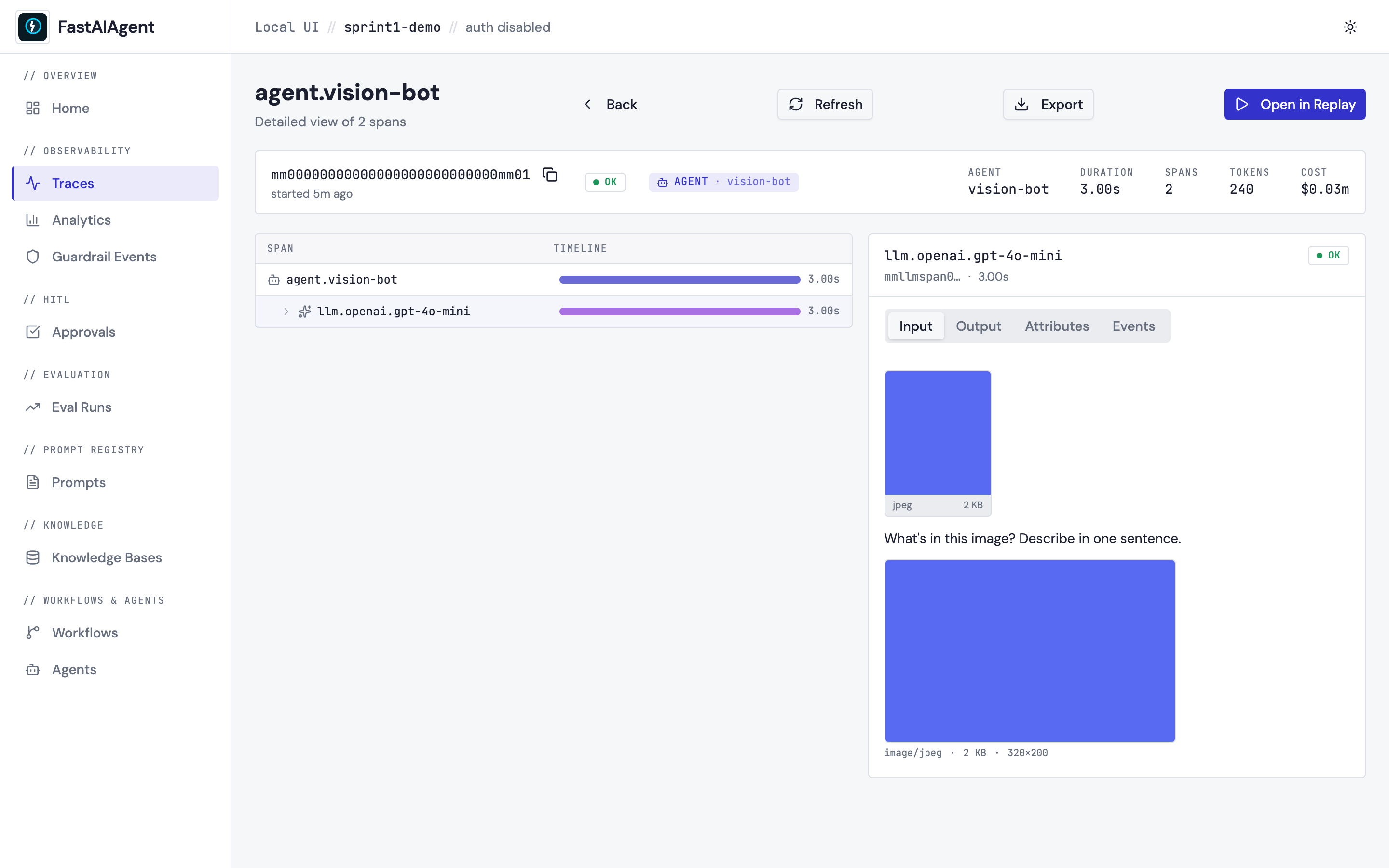
The screenshot above is captured by scripts/capture-sprint1-screenshots.sh
against the seeded agent.vision-bot trace. The Input tab shows two
multimodal surfaces stacked:
- The AttachmentGallery tile (top) — fetched from the binary
GET /api/traces/{tid}/spans/{sid}/attachments/{aid}endpoint. This is the SDK's persisted thumbnail (256 px JPEG, generated when the agent ran). - The MixedContentView (below) — the inline render of the actual
gen_ai.request.messagescontent parts: a text block followed by the image. The image data is embedded in the message itself, exactly as the provider received it.
What gets detected as multimodal
MixedContentView walks the input/output JSON and looks for content parts.
A part is treated as an image if it has any of:
type: "image",type: "input_image", ortype: "image_url"- a
media_typethat starts withimage/
A part is treated as a PDF if it has any of:
type: "input_pdf",type: "pdf", ortype: "document"media_type: "application/pdf"
Otherwise the JSON falls through to the existing JsonViewer so plain
text/JSON traces look identical to before this feature shipped.
PDF rendering
PDFs render as a card with a paper icon, the filename, a page-count badge, and the size:
Click the card to open the page renders in a modal. If the PDF was processed in text-only mode (no page renders stored), the card shows a "Text extracted" tag instead.
Full-resolution data
By default the SDK stores only the 256-px thumbnail. Click an inline image to open the full-size modal — when full bytes weren't captured the modal falls back to the thumbnail and shows:
Full resolution not stored. Enable
trace_full_images=Truein your SDK config to capture full-resolution data.
To capture full bytes:
or set FASTAIAGENT_TRACE_FULL_IMAGES=1 in the environment. The trade-off is
database size: full-res images can be 1–10 MB each.
The bytes stay local — they live in local.db and never ride the span export
path, so they do not reach the control plane or any add_exporter target. The
?full=1 modal above and fastaiagent traces export do hand them back to you
locally; see Attachment bytes for the
posture.
Replay & Fork integration
The MixedContentView renders in three places:
| Surface | When |
|---|---|
| Trace detail Input/Output tabs | Always — the primary surface |
| Replay comparison panes | Original vs Rerun, side-by-side, so visual differences are obvious |
| Fork modal Input preview | Inspect the image before forking and re-running |
Backend test fixture
The screenshot above is captured against a seed function the e2e tests use too:
from fastaiagent.ui.attrs import extract_content_parts, has_multimodal_part

msg = [{
    "role": "user",
    "content": [
        {"type": "text", "text": "What's in this image?"},
        {"type": "image_url", "image_url": "https://...", "media_type": "image/jpeg"},
    ],
}]
parts = extract_content_parts(msg)
assert has_multimodal_part(msg)
The Python helper is the source of truth for which content shapes count as multimodal — both the e2e tests and the frontend's renderer agree on the same set of types.
Try it from the examples
These examples produce traces with multimodal input that the inline renderer picks up:
examples/43_multimodal_image.py— vision LLM describes a synthetic image. Look at the LLM span's Input tab in the Local UI.examples/44_multimodal_pdf.py— agent reads a PDF. The trace's Input tab shows the document card with the page-count badge.examples/45_multimodal_chain.py— multimodal payload survives a Chain-state checkpoint round-trip.examples/46_multimodal_swarm.py— multimodal input flows through a Swarm with handoffs; the inline thumbnail appears on whichever agent currently holds the request.