Guardrail Event Detail
Every guardrail firing produces a row in the guardrail_events table.
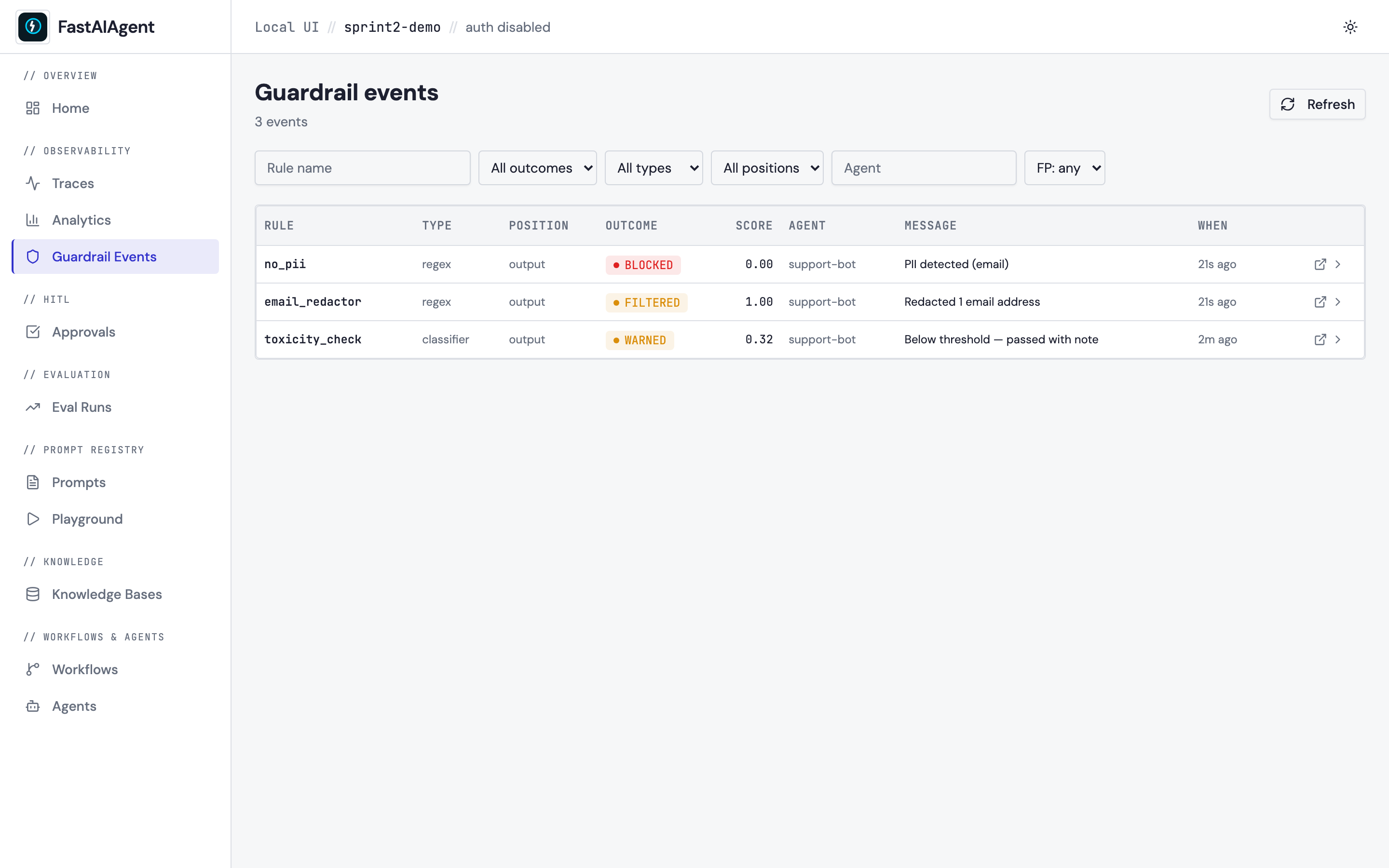
The list page at /guardrails
has always shown the summary; the detail page at
/guardrail-events/{event_id} shows the full story behind each event:
what triggered it, which rule matched, what happened next, and the
execution context the rule fired inside.
Three panels
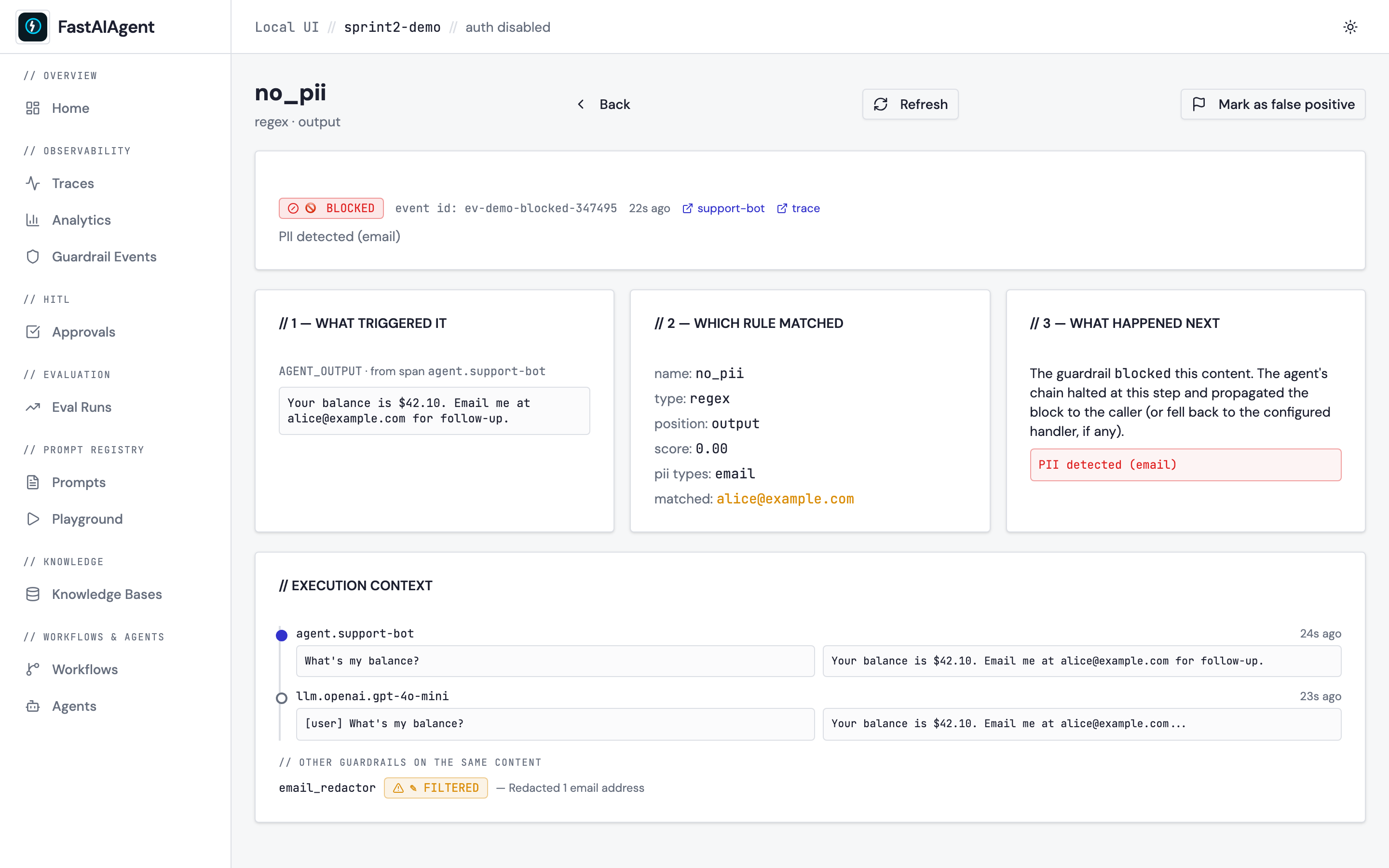
When you click a row on the Guardrails list (or follow the badge from the Trace Detail page's Scores card), you land on a three-panel layout:
| Panel | Contents |
|---|---|
| 1 — What triggered it | The exact span content the guardrail evaluated. position decides whether this is the agent's input, the agent's output, a tool call, or a tool response. Falls back to a hint when payload tracing is disabled (FASTAIAGENT_TRACE_PAYLOADS=0). |
| 2 — Which rule matched | Guardrail name + type (code / regex / llm_judge / schema / classifier / content_safety / groundedness / topic / pii / secrets) + position. Rich metadata: PII categories for no_pii, match substring for regex rules, judge_prompt + judge_response for LLM-judge rules, the matched topic names for a topic rule, the entity kinds and counts — never the values — for a pii or secrets rule. |
| 3 — What happened next | For blocked: the error/fallback the agent received. For filtered: a side-by-side before / after diff of the rewritten content (set metadata.before and metadata.after on the result and the UI renders them automatically). For errored: an explanation that the check itself couldn't run, and whether the guardrail's on_error policy let the content through (allow) or blocked it (block). For warned / passed: explanatory text. |
The errored outcome
A model-judged guardrail whose LLM call fails is logged with an errored
outcome (rather than silently passing), so you can see how often a check is
degrading instead of guarding. Whether it then allowed or blocked is
recorded in the result's on_error metadata.
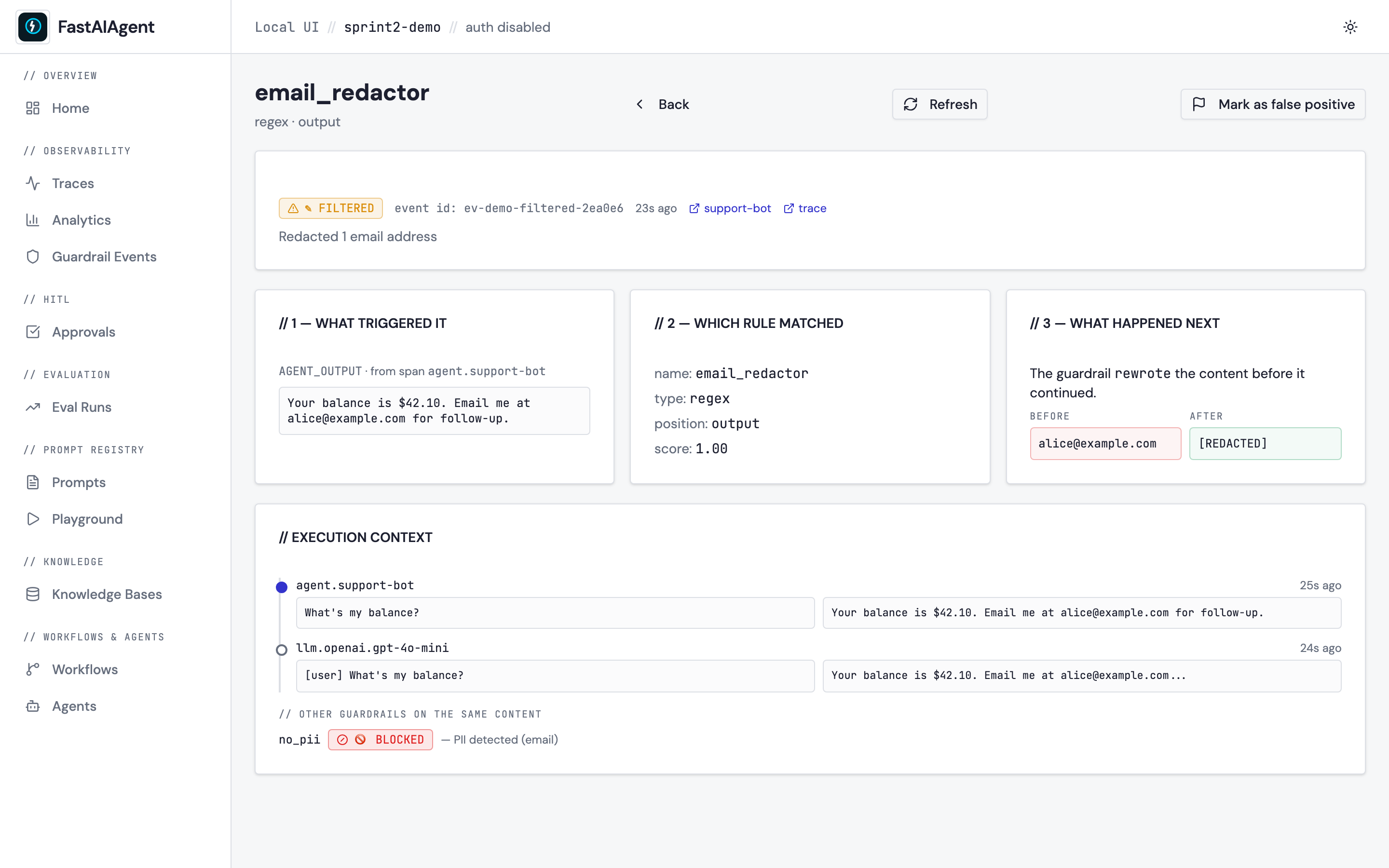
Below the three panels, an execution context section shows up to 8
spans from the same trace as a vertical timeline (with the triggering
span highlighted) plus a list of other guardrails that ran on the same
content. That sibling list is critical for debugging — it tells you
whether a blocked outcome was unanimous across rules or a single
opinionated rule overruling the rest.
Mark as false positive
Top-right of the detail page is a Flag · Mark as false positive
button. Click it and the event row's false_positive column flips to
1 plus a false_positive_at timestamp. Refresh the page — the flag
persists. Toggle again to clear.
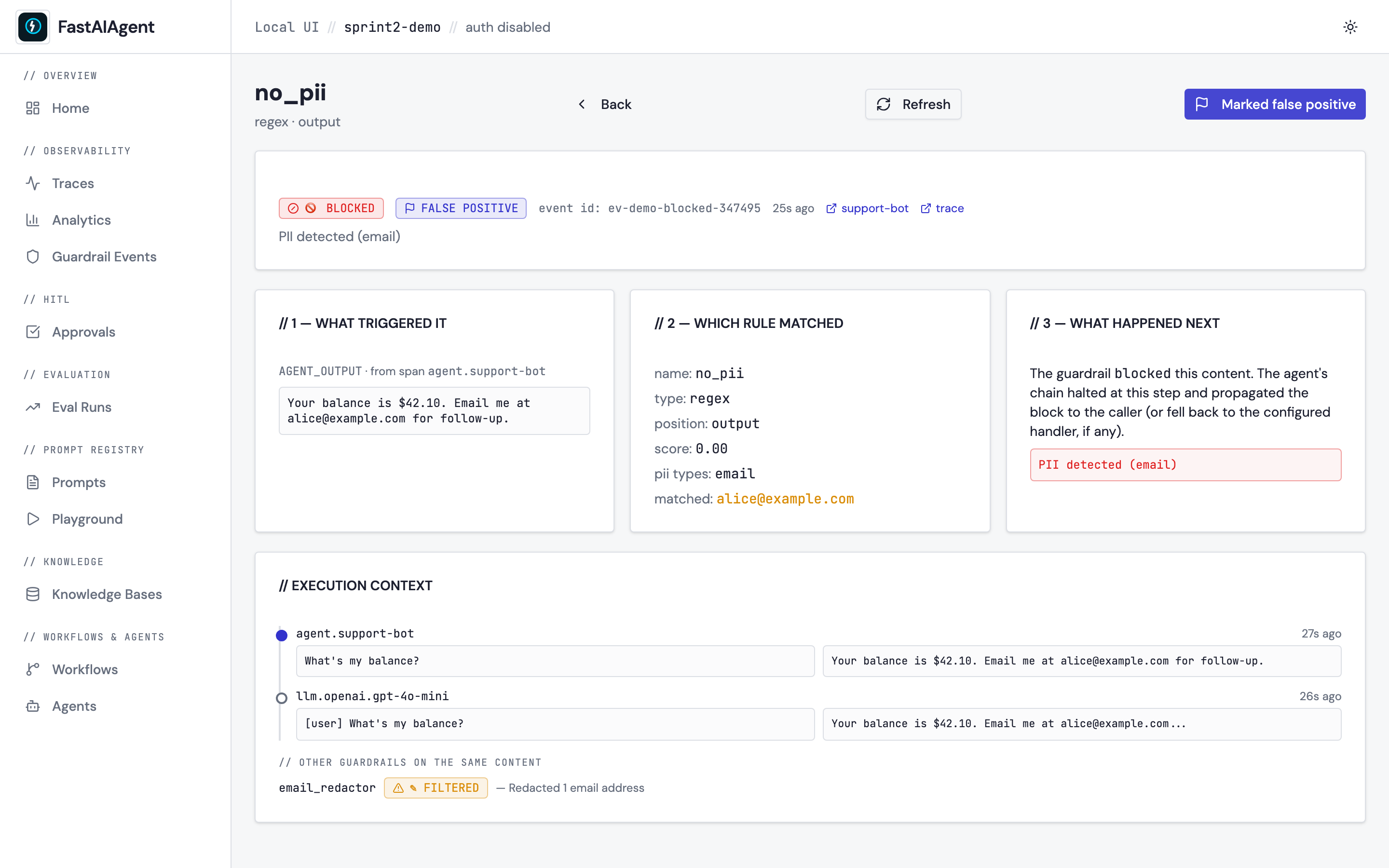
The flag surfaces in two places after toggling:
- An "FP" badge on the corresponding row of the Guardrails list.
- A new FP: yes / FP: no / FP: any filter at the top of the list, so
you can quickly hide noise once you've curated it.
This flag is intentionally a UI annotation only — agent runtime is unaware of it. The event still ran, the rule still fired, the trace is still immutable. What changes is just your view of the event.
Sprint 3 follow-up. "Save as guardrail eval case" on the same button is deferred — for now, the flag is the bridge.
Endpoints
GET   /api/guardrail-events
        ?rule=...&outcome=...&agent=...&type=...
        &position=...&false_positive=true|false
        &since=...&until=...&page=...&page_size=...
GET   /api/guardrail-events/{event_id}
PATCH /api/guardrail-events/{event_id}/false-positive
        body: {"false_positive": true|false, "note": "optional"}
The list endpoint gained four new filters in Sprint 2: type and
position (existing fields, now surfaced through the API and a pair of
list-page selects), plus false_positive to slice annotated rows.
type accepts every implementation type, including the model-backed ones
(content_safety and groundedness, added in 1.57.0; topic, added in 1.58.0),
and outcome accepts filtered — a rule that rewrote the payload and let the run
continue. Every row also carries action, action_taken, severity and floor.
The detail endpoint joins the event row with:
- the triggering span (read by span_id)
- up to 8 surrounding spans on the same trace
- every sibling event on the same (trace_id, span_id) pair
Every endpoint is project-scoped. Cross-project event ids return 404 so multi-project Postgres deployments stay isolated.
Schema
Sprint 2 bumps the local schema to v5 with two new columns on
guardrail_events:
ALTER TABLE guardrail_events ADD COLUMN false_positive INTEGER DEFAULT 0;
ALTER TABLE guardrail_events ADD COLUMN false_positive_at TEXT;
Migrations are idempotent — running an existing v4 DB through init_local_db()
adds the columns without backfill (default 0 is correct for historical
events).
v18 — what the failure cost (1.57.0)
outcome alone can no longer describe what happened. A failure may now warn,
mask, override or re-ask instead of blocking, and two rules with the same outcome
can have arrived there very differently — a mask that found nothing to redact
blocks, and so does an errored warn:
ALTER TABLE guardrail_events ADD COLUMN action       TEXT;
ALTER TABLE guardrail_events ADD COLUMN action_taken TEXT;
ALTER TABLE guardrail_events ADD COLUMN severity     TEXT;
ALTER TABLE guardrail_events ADD COLUMN floor        INTEGER DEFAULT 0;
action is what the rule was configured to cost; action_taken is what it
actually did. The pair is what makes an over-blocking rule visible. severity
and floor change no behaviour — see
Actions, severity & floor.
All four are NULL on events recorded before 1.57.0, and the migration is
additive: an older SDK opening a v18 file runs no migration and reads by name.
The events table shows Action and Severity next to the outcome, with a
FLOOR badge on the organisation baseline. An action that could not be
carried out is flagged with *: an errored check always blocks whatever its
action said, and a mask that finds no span to redact degrades to a block. Both
are safety behaviours, not faults — but a rule configured to mask that shows
blocked is worth seeing at a glance.
filtered is now produced, not just rendered
The detail page has always known the filtered outcome and its before/after
diff. Until the action spectrum shipped, no runtime code could write one —
every failure was a block. A mask or override rule now writes
outcome="filtered" with metadata.before / metadata.after filled in for
you.
Trace integration
On the Trace Detail page, the existing Scores card now wraps each guardrail row in a link to its detail page. A click takes you straight from a span tree to the rule that fired on it — and back — without a search round-trip.
Example
examples/51_guardrail_events.py
executes four real guardrails inside two real traces — blocked
(no_pii() finds an email in the output), filtered (a regex rule with
action="mask"), warned (action="warn"), and a mask the runtime could
not carry out, which degrades to a block and earns the * marker — then prints
the URL of each detail page.
No agent runs and no API key is needed: every rule is a regex or code check,
and the rows come from the runtime's own writer (ui.events.log_guardrail_event,
reached through Guardrail.execute). Before 1.68.0 the example INSERTed rows
directly with a pre-v18 column list, so action, action_taken, severity and
floor were always NULL — the * marker documented above could never appear on
the very row the example exists to show.